Why I still track my expenses manually in 2026
By Teo Jun Sheng Pierre · Updated
On this page
- The short version
- Manual tracking isn't what it used to be
- The typing is the point
- Why I never bothered with bank syncing
- I'm tracking spending, not doing accounting
- The trips are where it earns its keep
- Three years later
- Where CashJot fits
- Frequently asked questions
- Is manual expense tracking still worth it in 2026?
- How much time does it actually take?
- Don't you forget entries?
- Why not just check your banking app?
I've tracked my expenses manually for the past three years, and I'd do it the same way again today. Not because I'm unusually disciplined. Logging got fast enough that it became almost automatic, and those couple of seconds of typing turned out to be the part that actually mattered.
Before we go any further, a quick disclosure: I make CashJot, an iPhone expense tracker built around this exact approach, so I'm obviously not neutral. Nothing in this article depends on my app, though; any tracker with a fast entry form can work. And if you're still deciding between manual tracking and connecting your bank account, I'd recommend reading my comparison of the two first.
The short version#
- Logging got fast enough (an amount and a tag, autocomplete, favourites, in-store Apple Pay taps that log themselves) that discipline stopped being the deciding factor.
- The couple of seconds of typing is the feature, not the cost: it makes the purchase register at the moment it happens.
- Where I live, bank syncing was never really on offer, and cash and QR payments wouldn't have appeared in a feed anyway.
- I track spending, not accounts. Nothing to reconcile means nothing to fall behind on.
Manual tracking isn't what it used to be#
When people hear "manual expense tracking," they usually picture spreadsheets, receipts stuffed into a drawer, or an end-of-month session spent reconstructing where the money went. That's not what I do.
When I open my expense tracker, the entry screen is already waiting. Most expenses are an amount and a tag, and most of those tags are just Food & Drinks. For everything else, autocomplete does the work: type two letters of "MRT" and it fills in the name and tag from previous entries. The things I buy on repeat, the usual lunch, the weekly top-up, coffee from the same place, are saved as favourites and log with a single tap.
Some expenses need even less. Subscriptions and recurring bills are created once and appear on schedule every month: rent, Spotify, iCloud. And for in-store Apple Pay purchases, I use a one-time Apple Shortcuts automation that pulls the amount and merchant from Wallet and logs them automatically, no bank login involved. It isn't perfect, it depends on your bank, and it only covers in-store taps, but it means a big chunk of my everyday spending logs itself.
Everything else takes about two seconds, and that speed is the whole story. Every tracker I tried before asked too much per entry: merchant, category, account, notes, payment method, sometimes location. Five or six questions per purchase is the kind of friction habits don't survive.
The typing is the point#
Paying has never been easier: tap your phone, hear the beep, done. That convenience is exactly why it's so easy to lose track, because the payment itself barely registers.
Here's a simple test. Do you know how much you've spent today? Not roughly this month. Today. Most people I ask are further off than they expect.
Typing the amount forces me to notice the purchase for a couple of seconds, and that's all manual tracking is: adding back the tiny pause that contactless payments removed. That pause has done more for my spending than any report I've read after the fact. Research on budgeting points the same direction: paying attention to spending changes behavior. A bank feed gives you a complete record, and it can't make you notice a purchase while it's happening, which is the part that matters for changing habits.
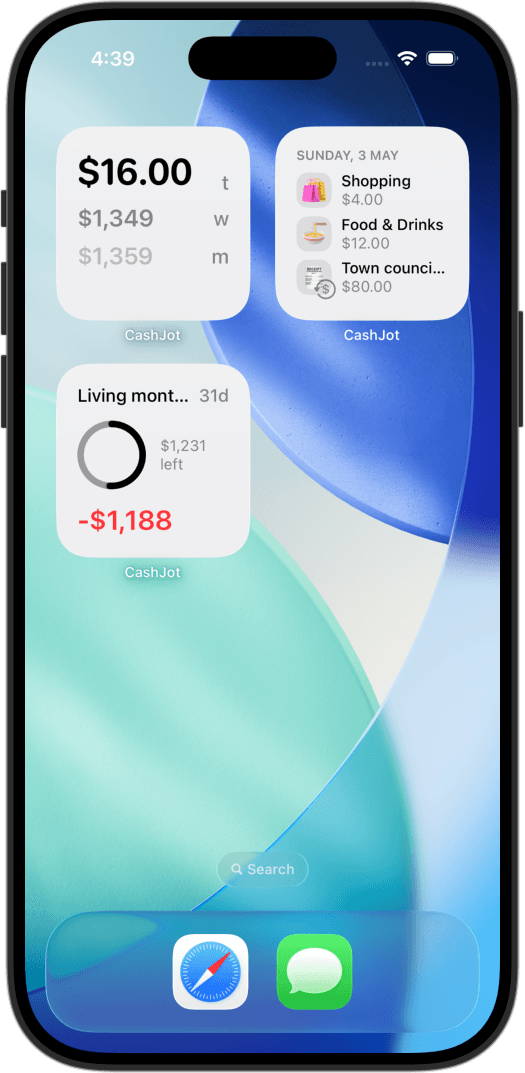
The other half is keeping the number visible. My home screen widget shows what I've spent today, this week, and this month; another tells me whether today is above or below my daily budget. I glance at them the way I check the weather. Those glances keep spending in the back of my mind, and they catch missed entries too: a today total that looks a little low is usually how I remember the coffee from an hour ago.
Why I never bothered with bank syncing#
Living in Singapore made this decision for me. Most local banks don't offer the official data access budgeting apps rely on, so apps promising automatic sync often get there by screen scraping: logging into your internet banking on your behalf with credentials you hand over. That was never a trade I was comfortable with, and even official bank connections ask for a level of trust I'm not sure an expense tracker needs. They're also the single most complained-about feature in budgeting apps; when a feed breaks, the cleanup lands on you.
Even a perfect bank feed wouldn't capture how I actually spend. Cash is still part of everyday life here, and PayNow is everywhere, especially at hawker stalls. A QR payment shows up in a bank statement as a transfer to a registered name: it tells you who received the money, and nothing about whether you bought chicken rice, coffee, or groceries. The "complete record" a feed promises has holes exactly where my daily spending lives.
Manual tracking treats all of it the same. Cash, card, Apple Pay, or PayNow, the expense goes into the same log and takes the same couple of seconds.
I'm tracking spending, not doing accounting#
This is probably the biggest reason the habit has lasted. I don't reconcile accounts, record which card I used, track balances, or log transfers. I'm not recreating my bank statement. My expense log answers one question, what did I spend money on, and my banking app answers a different one, how much money do I have. Keeping those jobs separate is what keeps the log light.
For balances, my banking app is exactly right: Face ID, secure authentication, full transaction history. For "what did today cost me," it's surprisingly awkward. I have to unlock it, wait for it to load, and scroll a list that mixes spending with transfers, incoming payments, interest, and refunds, with merchant names that can still take a moment to decode. None of that is bad design; a banking app is built for security and record-keeping, and I'm asking a different question.
I think a lot of budgeting advice misses this split. Some people want full accounting: every account reconciled, every dollar assigned, everything balanced at month end. For them, tools like YNAB are excellent. I just want to know where my money goes and whether today is roughly on track. Once I stopped treating expense tracking like bookkeeping, the habit got much easier to keep, because there's nothing to reconcile and nothing to catch up on. Three years in, I've never opened the app to find an hour of financial homework waiting.
The trips are where it earns its keep#
At home I keep a fairly tight budget. On holiday I spend much more freely, which is precisely when overspending happens, and precisely when I want visibility.
Every trip gets its own Expense Group with its own budget. I log in the local currency, Thai baht or Japanese yen, and everything converts back to Singapore dollars at the rate I set for the trip. Holiday spending stays separate from everyday spending: at home, my daily total isn't inflated by a week in Tokyo, and while traveling, I can focus on whether the trip is staying inside its budget.
The habit itself doesn't change, still a couple of seconds per expense. What changes is what the numbers let me do: if I'm halfway through a trip and 80% through the budget, there's still time to skip the expensive cocktail or pick the cheaper restaurant. Finding out after I'm home, when it's all on the statement, has never helped.
Three years later#
The biggest benefit is simple: I almost always know where I stand. What today cost, how the month is going, what my subscriptions add up to over a year. Very little surprises me anymore, and none of it feels like work.
That last part is what I didn't expect. When I started, I assumed success would come from becoming more disciplined. It came instead from making the habit cheap enough that discipline barely mattered.
This approach is shaped by my circumstances, and yours may point the other way. I live somewhere without good bank connectivity for budgeting apps, I regularly pay with cash and PayNow, I have no appetite for bookkeeping, and my phone makes logging nearly invisible. If almost everything you spend goes through cards, your banks offer reliable connections, and you want a complete financial record, a bank-connected app probably makes more sense, and these four questions will tell you which side you're on.
Where CashJot fits#
CashJot is the app I built because this is the only approach I've stuck with long term, and everything in it is designed to make manual tracking cost as little as possible. The expense form is the first thing you see, an amount alone is enough to save, autocomplete remembers the places you log most, recurring entries handle subscriptions and bills, Expense Groups separate trips and projects from everyday spending, and your data stays on your phone and in your own iCloud account.
That design means accepting real limits. CashJot won't discover a forgotten subscription, import years of bank statements, or reconstruct spending you never recorded. Every entry exists because you logged it, or because your own device captured it through an automation you chose to set up. I think that's a worthwhile trade.
It's free on iPhone with no account to create. Try it for a week on your next few coffees, and find out what a normal day actually costs you.
Frequently asked questions#
Is manual expense tracking still worth it in 2026?#
More than it used to be, on both ends of the trade. Logging has gotten cheaper: entry forms that accept an amount alone, autocomplete, and in-store Apple Pay taps that can log themselves. And the case for noticing has gotten stronger, because contactless payments removed the moment where you'd otherwise register what you spent. The exception is unchanged: if what you want is a complete, hands-off archive, a bank-linked app serves that goal better where connections are supported.
How much time does it actually take?#
A few seconds per entry, a minute or two a day in total. Time isn't the real cost, decisions per entry are, so a tracker that accepts an amount alone will last where a six-field form won't.
Don't you forget entries?#
Sometimes, and it matters less than you'd think. A widget showing today's total makes a missing entry visible while you can still remember it, and a stray coffee slipping through doesn't change what the log is for. A record that catches most of your spending is honest enough to steer by. If gaps bother you on principle, that's a sign you want the complete-record approach instead.
Why not just check your banking app?#
Because banking apps are built for security and record-keeping, not for watching spending. The transaction list sits behind a login and only loads online, spending is mixed with transfers, interest, and incoming money, and it only covers that one bank. Cash never appears, a QR transfer shows up with no hint of what it bought, and whatever you find is after the fact, past the moment where noticing could have changed anything. The banking app is the right tool for balances, and the wrong one for knowing what today cost.
Written by Teo Jun Sheng Pierre, maker of CashJot.
Know what today cost you
CashJot is an iPhone expense tracker. Jot each expense in a couple of taps, then see today's total straight from the home-screen widget. Free on the App Store.