
See today's spending without opening anything
Today's spend, budget pacing, recent transactions, and upcoming bills, on the home screen and the lock screen. Tap any of them to land in the Log tab.


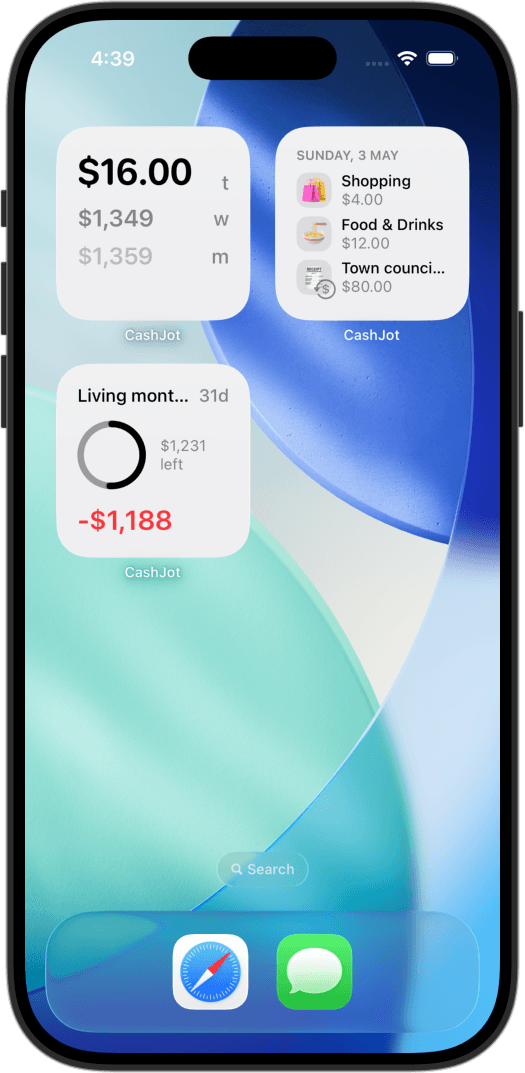
Spent Today, This Week, This Month
One number, on the home screen. Pick the window (today, this week, or this month) and the widget shows the total without you opening anything. Optionally exclude recurring so the figure reflects just the discretionary side.
Budget progress, live
The Budget widget shows real-time pacing toward any budget you've set. A gauge and a number, side by side. You see the limit and the remainder without taking a tap.
Recent transactions, on the home screen
A short list of what you logged most recently. Useful as a memory aid ("did I already log lunch?") and as a sanity check for the day's spend without opening the app.
Configurable per Expense Group
Daily on the main home screen, "Tokyo 2026" on a focus screen, "Side Project" on a work screen. Each widget is scoped to whichever group you pick when you add it, so each home screen shows the spend you care about there.
Tap to land in the Log tab
Tap the widget and CashJot opens straight into the quick-log form. The form starts empty; type the amount and tag, autocomplete fills the rest from your history.
On the lock screen too
A small spend dial or a one-line spend total on the lock screen, plus a budget dial. Tap either to land in the Log tab or the budgets view. The log doesn't have to wait for unlock.
Upcoming bills, small widget
The next three recurring bills with relative dates, like "Tomorrow" or "In 3d." Tap to land in the Recurring tab. Small widget on the home screen.
The approach
The home screen and the lock screen are surfaces you already look at often, so they're natural spots for the number you want to keep half an eye on. CashJot puts the spend total, budget pacing, recent transactions, and upcoming bills there, and tapping any of them lands you in the matching tab. The full loop, see, log, see again, fits inside a glance and a tap.
Frequently asked
Do widget taps fill in the amount?
No. Widget taps open the Log tab on an empty form so you can type the amount and tag. Only the Apple Pay capture notification lands you on a prefilled review sheet.
Can I show different Expense Groups on different widgets?
Yes. Each widget instance is configured separately. Put a Spent Today widget for your Daily group on the main home screen, a Budget widget for the trip on a focus screen, and a Recent Transactions widget for your Side Project group on a work screen. Long-press the widget, tap Edit, and pick the group.
Do the widgets update in real time?
Widgets refresh whenever you log a new entry, and iOS keeps them up to date in the background. So the Spent Today total and Budget progress reflect what you logged moments ago, without needing to open the app.
Do widgets work offline?
Yes. CashJot is offline-first, and the widgets read from your local data. They render whether or not you have signal, the same way the app does.
Do I need CashJot Plus to use widgets?
The widgets themselves are free. You'll want CashJot Plus to fully use them, since the Budget widget needs a budget to track and per-group filtering is most useful when you have multiple Expense Groups. Both budgets and multiple groups are Plus features.
Glanceable. Built for the home screen.