Spreadsheet, Notion, or an app: where should you track your expenses?
By Teo Jun Sheng Pierre · Updated
On this page
- Key takeaways
- The counter test
- When is a spreadsheet the right expense tracker?
- The two honest patches
- Notion: a beautiful ledger, one tap too far
- What do dedicated expense apps get right?
- Two kinds of app: manual and bank-linked
- Four questions that decide it
- 1. Where does your spending actually happen?
- 2. Do you already live in one of these tools?
- 3. Will you log per purchase or review per week?
- 4. Does it matter where the record lives?
- You can switch, so choose for today
- Frequently asked questions
- Is a spreadsheet or an app better for tracking expenses?
- Is Notion good for tracking expenses?
- Can I track expenses in Google Sheets on my phone?
- What's the best free way to track expenses?
- Can I start in one tool and switch later?
- Sources
There's no best tool for tracking expenses. There's the tool you'll still be using in six months, and the fastest way to find it is to ask what happens at the moment you pay.
Most comparisons argue features. Spreadsheets are flexible, apps are convenient, Notion is customizable, and none of that settles anything. Each of these tools is a bet about where tracking happens. A spreadsheet bets on the desk. Notion bets on the weekly review. An app bets on your pocket. The right choice is the bet that matches where your spending actually happens, and where you'll record it.
We make CashJot, an iPhone expense tracker, so we're one of the classes below and obviously not neutral. You don't need our app for any of this, and when a spreadsheet or a Notion page is the better answer, we'll say so.
This choice is getting more common, not less. Just over half of US adults, 53%, say they have a budget for 2026, up from 46% a year earlier (YouGov, 2026). Every one of those budgets needs a spending record somewhere, and "somewhere" is exactly the decision this article is about.
One thing this article won't do is pick a budgeting method for you. Methods are a separate question, and we've compared those too. Every method needs a spending record underneath it, and this piece is about where that record should live. (It's the second of the three decisions that make up a tracking setup.)
Key takeaways#
- Each tool class is a bet about where tracking happens: spreadsheets bet on the desk, Notion bets on the weekly review, apps bet on your pocket.
- Spreadsheets are still the most-used budgeting tool in the US at 35% of adults; apps sit at 16% overall but lead among 25-to-34s (YouGov, 2026).
- The deciding scene is the counter, because small repeated purchases are where tracking lives or dies.
- Every class exports CSV, so the choice isn't permanent. Choose for the life you have today.
The counter test#
You've just paid $4.50 for a coffee. You're still standing at the counter, phone in hand.
What does recording that purchase take, right now, in each tool?
This one scene decides more than any feature list, because small purchases are where tracking lives or dies. A coffee, a transit tap, a quick lunch: three or four a day, small enough to forget by evening. Whatever you don't capture in the moment, you have to reconstruct later, and reconstruction is the chore that ends most tracking habits.
Here's that moment, tool by tool.
| Spreadsheet | Notion | Manual app | Bank-linked app | |
|---|---|---|---|---|
| Logging the coffee at the counter | Find the file, the sheet, the row, the cell | Open the app, find the database, add a row, fill its properties | Amount and a tag: about 2 seconds | Nothing to do |
| When you notice the spend | At your next review | At your next review | The moment you type it | Later, in a feed |
| Works offline | Yes, once set up | Partly, with real limits | Usually by default | Syncs when connected |
| Captures cash and QR payments | If you type them | If you type them | If you type them | No |
| Upkeep | Formulas and structure are yours to maintain | Template and database upkeep | Keeping the habit | Fixing broken connections |
| Where your data lives | Your file, or your Google account | Notion's servers | Varies; can stay on your phone | The app's servers, plus an aggregator |
| Price | Free | Free tier; templates free to about $50 | Free to subscription | Usually subscription |
The columns split four ways instead of three because "apps" hides two camps that behave in opposite ways at the counter. A bank-linked app asks nothing of you in the moment and shows you the purchase later. A manual app asks for 2 seconds now and shows you the purchase immediately. That difference matters enough to keep them apart in the table, and we've compared the two camps properly if that's the decision you're weighing.
When is a spreadsheet the right expense tracker?#
A spreadsheet fits you if your logging happens at a desk, in batches, and you want total control for free. That's not a niche choice: manual tools like spreadsheets are still the most widely used way to budget in the US, at 35% of adults, ahead of every other tool class (YouGov, 2026).
The spreadsheet is the only tool here with no opinions about your money.
Any structure you can imagine, you can build. Any chart, any formula, any category scheme, split across sheets however you like. It's free, it works the same way it did fifteen years ago and will in fifteen more, and the file is unambiguously yours. No servers, no subscription, no company between you and your data.
There's a quieter argument for the spreadsheet too: it's where everything else ends up. Nearly every tracking tool exports to CSV, which is to say every tool eventually becomes a spreadsheet. Starting there just skips a step.
So why doesn't everyone just stay in a spreadsheet? The cost is the counter. On a phone, the flow is real work: open the app, find the file, find this month's sheet, scroll past everything you've already logged, tap a cell half the width of your fingertip, and type into it. Offline holds up better than you'd expect, since a sheet marked available offline can be edited without a connection and syncs later. The problem was never the connection. It's the fingertip-sized cell at a coffee counter.
The two honest patches#
We've seen spreadsheet people run two honest patches for this. One is a Google Form pinned to the home screen, feeding rows into the sheet: amount, category, submit, and you're done, though your reports now live a tab away from your logging. The other is paying someone to type for you. Tiller pulls bank feeds into a Google Sheet or Excel file every day for $99 a year, which makes it the spreadsheet class's answer to bank-linked apps, with the same trade-offs. It runs on the same US-centric aggregators, misses cash, and everything that comes with a bank connection comes with it. Microsoft tried this too and gave up; Money in Excel was retired in 2023.
Building a proper budget sheet is a project in its own right. This walkthrough gives a fair picture of the work, and of the payoff:
A spreadsheet is for you if you:
- enjoy building and maintaining the system itself
- do your logging in batches at a desk, from receipts or a bank statement
- want zero ongoing cost and zero lock-in, forever
Notion: a beautiful ledger, one tap too far#
Notion can hold an expense tracker, and plenty of people want it to. Notion passed 100 million users in 2024, and its marketplace lists 379 templates in the expense-tracker category alone at the time of writing (Notion Marketplace, 2026). Whether it should hold yours comes down to when you log.
A Notion expense tracker is a database template inside a general-purpose workspace app. That's both the appeal and the problem.
The appeal is real. If your projects, notes, and plans already live in Notion, your money can live one page away, related to everything else. The template ecosystem is enormous, free to about $50, and the good ones are relational in ways no app's fixed category screen can match: expenses linked to budgets, budgets linked to goals, a monthly review page that assembles itself. For sitting down on a Sunday with a cup of tea and actually looking at your month, Notion is the nicest room in this article.
The problem is the counter. Logging a purchase means opening the app, waiting for it to load, navigating to the tracker, and adding a database row, then filling its properties. That's the fast path, when everything cooperates.
And everything doesn't always cooperate. Notion added offline mode in 2025, but the fine print matters for an expense tracker: on the free plan, pages are only available offline if you've marked each one for download in advance, downloads don't follow you across devices, and an offline database keeps only the first 50 rows of its first view. An expense log is exactly the kind of database that outgrows 50 rows by mid-month. In a basement supermarket or on the train home, the rows you need may not be there.
If you're curious what a from-scratch setup involves, this build is representative:
So who does Notion actually suit? The person who doesn't try to log at the counter at all, and instead sits down once or twice a week to enter things in a batch, in the same workspace where the rest of their life is organized. None of Notion's limits bother that person.
Notion is for you if you:
- already run your life in Notion and want money next to it
- log in weekly batches rather than purchase by purchase
- care more about the review than the capture
What do dedicated expense apps get right?#
The counter. That's the moment a dedicated app is built for: capture in seconds, the running total in view, offline by default. What the class as a whole struggles with is keeping people. Across fintech apps, the median share of new users still active by day 30 is about 7% (benchmarks compiled by UXCam from AppsFlyer and Adjust data, 2026). An app only earns its place if it survives that curve on your phone.
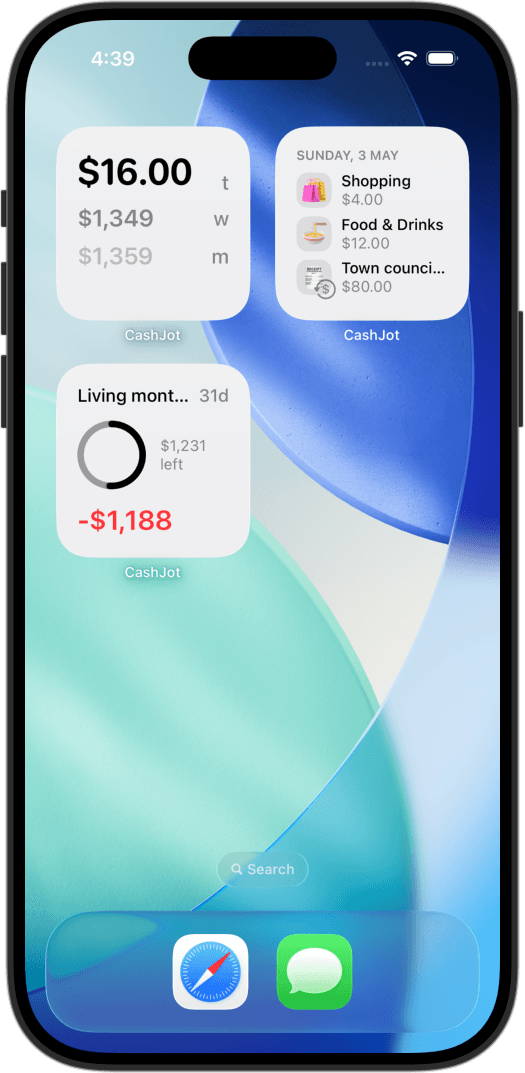
A dedicated expense app makes the opposite bet from both tools above. It assumes the counter is the moment that decides everything, and builds around it: an entry form as the front door, widgets that keep the running total on your home screen, reminders for bills, offline by default because a phone is offline whenever it matters.
Two kinds of app: manual and bank-linked#
The table already split this class in two. Bank-linked apps like Copilot and Monarch capture every card transaction with no effort and no counter moment at all, while manual trackers like Money Manager, Spendee, and CashJot ask for a couple of seconds per purchase and give you the awareness in exchange. Which side you belong on is its own decision, and it depends heavily on how much of your spending is cash or QR, and on whether your bank is supported where you live.
What does the class cost you? You're living in someone else's structure, and the roadmap, the pricing, and the feature set belong to them. Most of the capable ones are subscriptions. And the failure mode is sharper than a spreadsheet's: when we read low-star reviews of manual trackers, a quarter of them were about bugs or lost data, and losing years of entries hurts in a way a slow-loading page never will. In our experience the defense is the same regardless of which app you pick: choose one with CSV export, and use it now and then. If you can leave with your data, most of the lock-in risk evaporates.
Here's the fuller picture from that same review coding, across all nine apps we read:
Notice what sits at the bottom. The complaint everyone expects to dominate, falling behind on the upkeep, is 1% of the loud failures. It's the sync, the bugs, and the billing that fill the reviews. (Quiet abandonment leaves no review, so treat that 1% as a floor, not the full story.)
Since we're in this camp: CashJot's version of the bet is that logging should take about 2 seconds, an amount and a tag, with the day's total on a widget. In-store Apple Pay taps can even log themselves through a Shortcuts automation, no bank login involved. It has the class's trade-offs and a few of its own: it can't find a subscription you forgot, it can't import last year's statements, and every entry is one you logged yourself.
An app is for you if you:
- spend in exactly the places a desk isn't: counters, buses, hawker stalls
- want to log per purchase, or want purchases logged for you
- would rather keep a habit than maintain a system
Four questions that decide it#
1. Where does your spending actually happen?#
If most of your money moves in a few large monthly transactions, the counter test barely applies to you, and the desk tools get much stronger. If it moves $5 at a time all day, the counter test is the whole decision.
2. Do you already live in one of these tools?#
Don't underestimate the tool you already open every day. If you're in a spreadsheet or in Notion anyway, the friction of logging there is smaller for you than for anyone else, and using a tool you like beats installing one you don't.
3. Will you log per purchase or review per week?#
Per purchase points to an app, and only an app. Weekly batches open the field: a spreadsheet or a Notion template handles batch entry perfectly well, and the pleasant review session might be what keeps you coming back.
4. Does it matter where the record lives?#
A spending log is a diary: where you ate, who you saw, which pharmacy. A spreadsheet file can stay entirely yours. A Notion tracker lives on Notion's servers. Apps range from device-only to server-plus-aggregator, and it's worth knowing which one you're choosing.
You can switch, so choose for today#
How much does the choice lock you in? Less than the agonizing suggests. Every tool in this article can produce a CSV, and every tool can more or less swallow one.
That changes how much this decision weighs. You're not choosing a filing system for the rest of your life; you're choosing where next month's coffees get recorded. Start in the tool that fits your current life, export now and then, and if your life changes shape, take the file with you.
The common mistake is picking the aspirational class: the tool that fits the reviewing-on-Sundays person you plan to become, instead of the person standing at the counter today.
Frequently asked questions#
Is a spreadsheet or an app better for tracking expenses?#
It depends on where you log. Spreadsheets are still the most widely used budgeting tool in the US, at 35% of adults versus 16% for apps (YouGov, 2026), and they win for batch logging at a desk: total control, zero cost, no lock-in. If you want to capture purchases as they happen, an app wins, because a phone-first entry form takes seconds while a spreadsheet on a phone takes real effort. The counter test decides.
Is Notion good for tracking expenses?#
Notion is good at the review and weak at the capture. The demand is real, with 379 expense-tracker templates on the official marketplace at the time of writing, and the good ones make monthly reviews pleasant, especially if the rest of your life is already organized there. But logging a single purchase means opening the app and adding a database row, and offline access to a long expense database is limited. It fits people who enter expenses in weekly batches, not people who log at the counter.
Can I track expenses in Google Sheets on my phone?#
Yes, and offline editing works once you mark the sheet available offline. The practical problem is speed: finding the file, the row, and the cell takes long enough that most people stop doing it for small purchases. A Google Form pinned to your home screen and feeding the sheet is the usual fix.
What's the best free way to track expenses?#
A spreadsheet, without much argument. Google Sheets costs nothing, works offline, and holds any budgeting structure you want to build on top of it. Free tiers of tracker apps are the alternative if entry speed matters more to you than flexibility. What the free options don't include is bank feeds; those come with a subscription almost everywhere.
Can I start in one tool and switch later?#
Yes. CSV export is near-universal across spreadsheets, Notion, and tracker apps, so your history can move with you. The habit transfers less easily than the data, though. If you've built a working routine around one tool's counter moment or review session, expect a few rough weeks re-forming it somewhere else.
Sources#
- YouGov, US consumer spending and budgeting trends in 2026: survey of 1,340 US adults, fielded February 2026. Retrieved July 24, 2026.
- Notion, "100 million of you": official announcement, September 2024. Retrieved July 24, 2026.
- Notion Marketplace: template and category counts. Retrieved July 24, 2026.
- UXCam, mobile app retention benchmarks: compiled from AppsFlyer and Adjust data. Retrieved July 24, 2026.
- Our own review coding: 1,586 one- and two-star reviews of 9 budgeting apps, July 2026, published in why budgeting apps fail.
If you land on the app class, and the manual side of the fork, that's the corner we build for. CashJot is an iPhone expense tracker where an amount alone is a valid entry, the day's number sits on a widget, and the log stays on your phone and in your own iCloud. It won't reconcile a bank statement or rebuild your history, and it isn't trying to. It's built for exactly one moment: you've just paid, you're still at the counter, and logging it takes about 2 seconds.
Written by Teo Jun Sheng Pierre, maker of CashJot.
Know what today cost you
CashJot is an iPhone expense tracker. Jot each expense in a couple of taps, then see today's total straight from the home-screen widget. Free on the App Store.